
Google AI Mode with Gemini 4 Hydrogen: What Changes in Search and What You Should Do for Your Website
On 12 November 2026, Google announced the biggest model upgrade in the history of its search. Since then, the new model Gemini 4 Hydrogen has been running in Google Search, worldwide and for all users, with no subscription.1 For you as a searcher, that means longer questions, better tables, more images. For you as a business owner with a website, a different question arises: will you still be found in the new Google AI Mode answers? I looked at what Google has actually announced, what of it reaches Germany and what you should check on your website now.
Google AI Mode is the part of search where you ask whole questions and get an AI answer with links. Since 12 November 2026, it has been powered by Gemini 4 Hydrogen, a fast model for everyday use. Google promises four improvements: search understands nested questions better, breaks them down into many sub-searches (query fan-out) and so links to more different websites, shows more images and comparison tables, and answers more accurately in all supported languages.1 AI Mode is also available in Germany and in German.4 For your website, Google says: there are no special rules. If you are properly indexed and may appear with a snippet in normal search, you can also be linked in AI Mode.5
The key figures
- 12.11.2026: Launch of Gemini 4 Hydrogen in Google Search, worldwide for all users.1
- 4 changes: understanding intent, query fan-out with more links, more visual answers, better language understanding.1
- 51 instead of 50 points in the Artificial Analysis Intelligence Index compared with the larger Gemini 4 Argon, up to 54 at the highest reasoning level (Google's own figures).2
- More than 5 times fewer made-up statements than its predecessor Gemini 3.8 Flash, according to Google.2
- March 2026: the model's knowledge cut-off. Search pulls up-to-date information from the web.3
- 0 additional technical requirements to show up in AI Mode: no AI text file, no special schema markup.5
What is Google AI Mode?
According to Google, AI Mode is its most powerful AI search feature. You ask a question in plain language, get a fully written answer and can carry on with follow-up questions without typing everything out again. You reach it via google.com by tapping AI Mode after entering your query, or directly in the Google app.4 If you don't press the button, you search as usual.
The difference from AI Overviews, which appear above the normal results, is important. Both use similar technology, but they are not the same thing:
| AI Overview | AI Mode | |
|---|---|---|
| Where? | at the top of the normal results list | separate area with a conversation history |
| When? | only when Google considers it helpful, often not at all | always, whenever you open it |
| What for? | quick overview of a question | comparisons, trade-offs, multi-part questions |
| Follow-up questions | no | yes |
Source: Google Search Central and Google Search Help.5,4 Google explicitly points out that the two features can use different models and therefore show different answers and links.5
What is Gemini 4 Hydrogen?
Gemini 4 Hydrogen is the third model in the Gemini 4 family. Google describes it as a fast model for everyday work, while the two larger models are meant for long, difficult reasoning tasks.2
| Model | Strength according to Google | In AI Mode |
|---|---|---|
| Gemini 4 Hydrogen | fast, for everyday questions and agent tasks | for all users, no subscription |
| Gemini 4 Argon | deep, multi-step reasoning on very difficult problems | selectable for Google AI Pro and Ultra subscribers aged 18 and over |
| Gemini 4 Carbon | long, autonomous agent tasks, builds on Argon | not part of this update |
Sources: Google Blog, Google Search Help.2,4
It is notable that the smaller model scores just ahead of Argon in the Artificial Analysis overall index, 51 to 50 points.2 That is Google's own measurement, and an index always contains a selection of tasks. What matters most for search is that Hydrogen is fast enough to answer millions of queries at search speed. Developers pay 1.50 US dollars per million input tokens and 7.50 US dollars per million output tokens for Hydrogen via the Gemini API.2
The four changes in AI Mode
Google names four improvements in its announcement.1
1. Search understands what you mean. You can ask the way you think: with several parts, with typos or with very precise requirements. Search is meant to answer every part of your question instead of picking out the strongest keyword. An example from everyday business life: “I have a physiotherapy practice in Leipzig with two treatment rooms. Compare three ways of winning more new patients, with costs and effort, and give me a plan for the first four weeks.” In the past, that would have been four or five separate searches.
2. Query fan-out with more links. Search breaks your question down into many sub-questions, searches them at the same time and puts the results together. With Hydrogen, Google says this process becomes more thorough and links a wider range of websites, including pages you might not have discovered before.1 I explain what exactly that means in the next section.
3. More visual answers. Instead of a wall of text, you get more images, structured answers, comparison tables and purpose-built little tools.1 There is a catch for German users here: according to Google Help, the interactive elements with sliders and switches are currently only available in English to signed-in users.4 You also see tables and images in German, but not the little calculators for now.
4. Better language understanding. Google promises more accurate answers in all the languages AI Mode supports.1 German is one of them, and Germany, Austria and Switzerland are also enabled as countries.4
Query fan-out explained simply
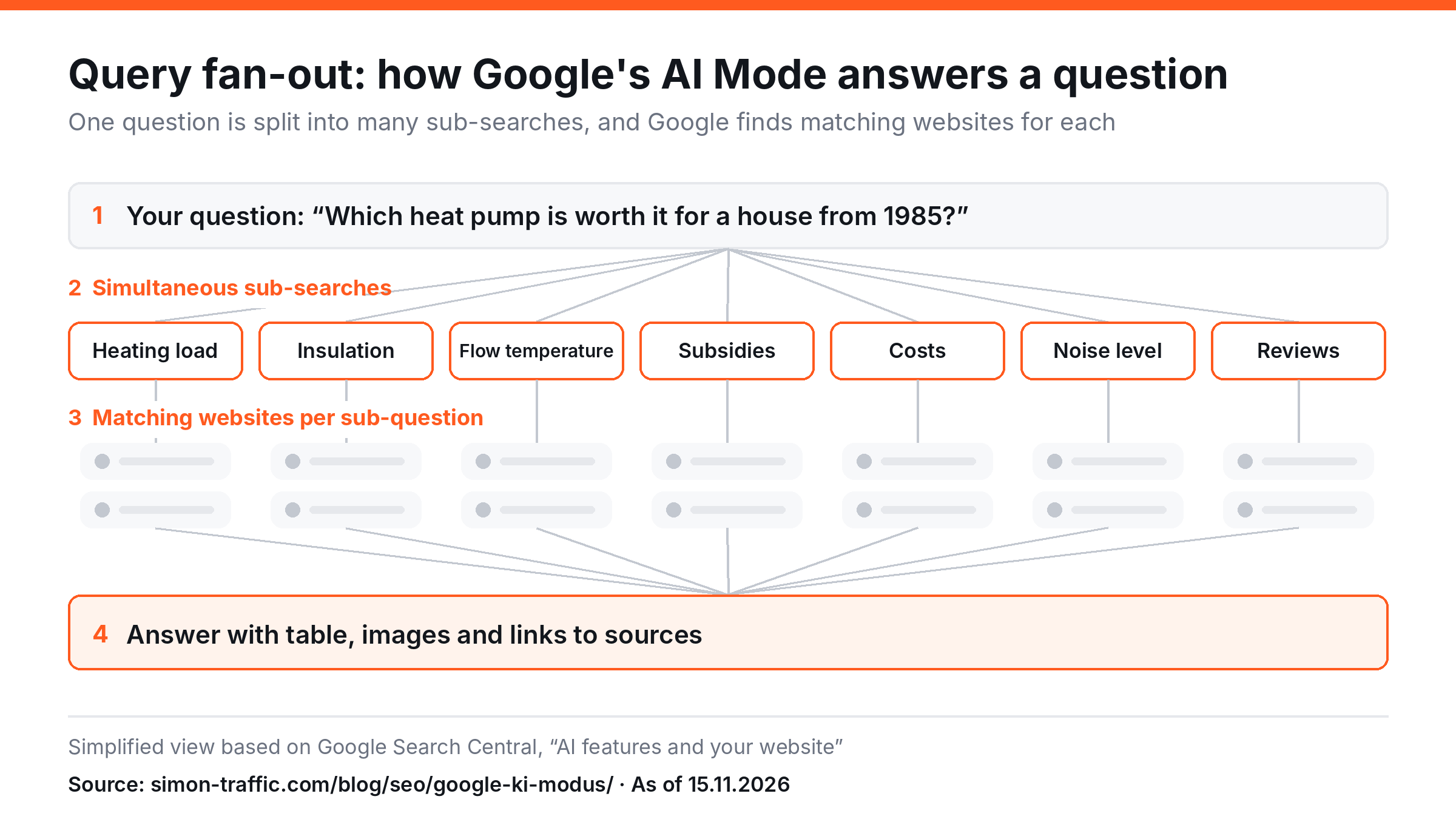
Query fan-out roughly means “fanning out the search query”. Google describes it like this: in the background, the AI runs several related searches on subtopics and data sources to build an answer, and finds further relevant pages along the way.5
Take the question “Which heat pump is worth it for a detached house built in 1985?” For a good answer, search needs knowledge about heating load, insulation, flow temperature, subsidies, costs, noise levels and owners' experiences. So it asks many sub-questions at the same time, pulls in relevant pages for each and summarises everything.
Use the graphic on your site
You may use the graphic freely with attribution. To do so, copy this code:
<a href="https://simon-traffic.com/en/blog/seo-visibility/google-ai-mode/"><img src="https://simon-traffic.com/assets/blog/google-ki-modus/query-fan-out-schaubild.en.png" alt="Query fan-out in Google AI Mode explained simply" width="1200" height="675"></a>
<p>Source: <a href="https://simon-traffic.com/en/blog/seo-visibility/google-ai-mode/">Simon Traffic, Google AI Mode</a></p>
For websites, this is the most important change. In a classic search, you compete for one query. With fan-out, you compete for many small sub-questions. A page that never ranked on page one for “heat pump older building” can still be linked as a source for the sub-question “flow temperature radiators 1985” if it answers exactly that question well. My assessment: pages with clear answers to specific detail questions benefit more than pages that only touch on a topic roughly.
How to use AI Mode
- Open it: Enter a question on google.com and tap “AI Mode”, or choose “AI Mode” on the home screen of the Google app.4
- Use the history: If you are signed in and have search history turned on, you can later pick up where you left off.4
- Choose the larger model: With a Google AI Pro or Ultra subscription, you can select Gemini 4 Argon in the menu if you are 18 or over. You need a personal Google account that you manage yourself.4
- Check the answers: Google itself writes that AI Mode is not always right and can misinterpret web content.4 The model card also lists hallucinations as a known limitation.3 So click the linked sources before you decide anything based on an answer.
AI Mode is not compulsory: it only opens when you call it up.4 According to Google, the AI features of search cannot be switched off. If you only want to see classic results, choose the “Web” filter after searching (possibly under “More”). It shows only text-based links, without an AI Overview.8 The filter only applies to the search in question, though.
What does this mean for SEO and your website?
Google has a dedicated page on AI features for website owners. The core message is surprisingly sober: the familiar SEO basics still apply, and there are no additional requirements and no special optimisation to appear in AI Overviews or in AI Mode.5
| What Google requires | What you check |
|---|---|
| Page is indexed and may appear with a snippet | Search Console, URL Inspection: “URL is on Google” |
| Crawling is allowed, including by CDN and hosting | robots.txt and firewall rules, for example with bot protection |
| Important content is available as text | prices, services, opening hours not only in an image |
| Good page experience and internal linking | important pages reachable via menu and text |
| Structured data matches the visible text | no markup for content that is missing from the page |
| Business profile and Merchant Center are up to date | opening hours, address, services and product data at Google |
| Images and videos complement the text | your own photos instead of stock images, where it fits |
Source: Google Search Central, “AI features and your website”.5
Three points from Google's documentation clear up common myths:
- No AI text files needed. You don't have to create new machine-readable files, AI text files or any special markup. There is also no special Schema.org markup for AI features.5 An llms.txt can make sense for other AI services, but according to Google it is not required for Google Search.
- Measurable in Search Console. Clicks and impressions from AI Overviews and AI Mode are counted in the performance report under the “Web” search type.5 Google does not offer a separate breakdown for AI Mode only.
- Controllable as before. If you don't want content to be quoted in search results, you use the familiar tools: nosnippet, data-nosnippet, max-snippet or noindex.5 That then also affects normal search, though.
That leaves the question of whether a website of your own is still worthwhile when the AI already supplies the answer. On this, Google says that clicks from search results with an AI Overview are of higher quality: visitors tend to stay on the page longer.5 There are no independent figures on this so far. And I learned something else: being mentioned in the answer text and being linked as a source are two different things. A brand can appear in the AI answer without its website getting a click.
My recommendation for small businesses: write a page for each important service that directly answers your customers' typical detail questions, with figures, conditions and examples. Those are exactly the answers fan-out looks for. You can only see indirectly how many clicks eventually come through AI Mode. So alongside the click-through rate, also watch enquiries and conversions, for example in your own dashboard built with Looker Studio.
The November 2026 core update is running at the same time
If you are seeing fluctuating rankings right now, don't be too quick to blame Hydrogen. On 10 November 2026, Google started the November 2026 core update, independently of it. It applies worldwide and to all languages, and the rollout can take up to two weeks.6
For core updates, Google advises waiting at least a full week after completion before comparing your own figures in Search Console. Small shifts of a few positions are no reason for hasty changes. Only with sharp, lasting losses is it worth thoroughly checking whether your content is really helpful.7
And what Google has not said about the Hydrogen update: there is no statement on how many more links or clicks websites will get, and none on changed rankings in classic search.1 Anyone who gives you firm numbers on this didn't get them from Google.
Conclusion: more chances for good detail pages, but no shortcut
With Gemini 4 Hydrogen, Google AI Mode becomes faster, more thorough and more visual, for all users, including in Germany. The most interesting change for websites is the improved query fan-out. When Google breaks a question down into many sub-questions, smaller pages also have a chance of being linked as a source, as long as they answer specific questions better than others.
There is no shortcut here. Google doesn't require AI files or special markup, but what has always made good SEO: an indexable page, clear text and answers that genuinely help people.
Frequently asked questions about Google AI Mode
What is Google AI Mode?
AI Mode is an area of Google Search where you ask whole questions in plain language and get an AI answer with links to websites. You can ask follow-up questions without starting over.4
How do I turn on AI Mode?
Enter a question on google.com and tap “AI Mode”, or choose it on the home screen of the Google app.4
Can I turn off AI Mode?
No, according to Google the AI features of search cannot be turned off. AI Mode only opens when you call it up yourself, though. And with the “Web” filter after a search, you see only text links, without an AI Overview.4,8
Is AI Mode available in Germany?
Yes. Germany, Austria and Switzerland are among the supported countries, and German is among the supported languages. The interactive tools with sliders are currently only available in English.4
What is Gemini 4 Hydrogen?
Gemini 4 Hydrogen is a fast model in Google's Gemini 4 family. Since 12 November 2026, it has been running in Google Search for all users, as well as in the Gemini app, in Google AI Studio and in the Gemini API.2
What is query fan-out?
With query fan-out, search breaks your question down into many sub-questions, searches them at the same time and builds an answer from the results. As a result, more and more varied websites are linked than in a classic search.5
Do I need to optimise my website for AI Mode?
According to Google, not separately. Your page must be indexed and may appear with a snippet in search. AI text files or special markup are not needed.5
Can I see clicks from AI Mode in Search Console?
Yes, they are counted in the performance report under the “Web” search type, although not reported separately.5
Suggested citation
Gütter, Simon (2026): Google AI Mode with Gemini 4 Hydrogen: What Changes in Search and What You Should Do for Your Website. Simon Traffic, 15 November 2026. https://simon-traffic.com/en/blog/seo-visibility/google-ai-mode/
Sources
- Google: Google Search gets a major upgrade with Gemini 4 Hydrogen, Robby Stein, 12.11.2026.
- Google: Introducing Gemini 4 Hydrogen, 12.11.2026.
- Google DeepMind: Gemini 4 Hydrogen, model card, 12.11.2026.
- Google Suche-Hilfe: Mit dem KI-Modus in der Google Suche KI-basierte Antworten erhalten, retrieved 15.11.2026.
- Google Search Central: AI features and your website, retrieved 15.11.2026.
- Google Search Status Dashboard: November 2026 core update, 10.11.2026.
- Google Search Central: Google Search's core updates and your website, retrieved 15.11.2026.
- Google Suche-Hilfe: Übersichten mit KI in der Google Suche, retrieved 15.11.2026.
All performance figures are manufacturer claims from Google. As of 15 November 2026.