
Google Antigravity Update: /swarm, Orchestrator, /run-workflow and Euro Prices
Is the Google Antigravity update worth it for you if you don't run a software company but a small business or an agency? Yes, but only for tasks that can be split into independent parts, and only with a paid plan. In November 2026, Google added three features for agent teams to Google Antigravity: /swarm as a preview since 10 November (in the app, according to the changelog, since 9 November), the Orchestrator with Gemini 4 Hydrogen since 12 November, and the Dynamic Workflows with the /run-workflow command since 13 November (in the command line since 14 November). With /swarm and /run-workflow, several AI agents work on one job, and with /run-workflow they do so simultaneously or one after another. The Orchestrator, by contrast, remains a single agent in which two models work together.1,2,3,5,11
Instead of making one agent wait for the next, with /swarm you give a team one job and check the result at the end. The catch: according to Google, a swarm uses up quota (the usage volume your plan allows per period) much faster than a normal chat.1,4 Here you can see what's new, what it costs in euros and how to try it out safely as a beginner.
The November Antigravity update mainly brings new ways to let several AI agents work as a team, in other words a multi-agent system. Three features are at its centre: /swarm (agents talk to each other via a shared board), /run-workflow (a short script starts many agents in a fixed sequence, and you can read it beforehand) and Orchestrator (a single agent in which a strong planner model plans and Gemini 4 Hydrogen does the work, which according to Google uses less quota and is faster than Carbon alone).1,2,3 With a personal account, you need at least Google AI Pro for €21.99 a month for /swarm and /run-workflow.3,4,7 Gemini 4 Carbon and the Orchestrator (Carbon) are only available in the Google AI plans in Ultra from €99.99 a month.5,7 To get started, I recommend two agents, because according to Google teams use up quota quickly. With customer data, caution is needed, because under the terms of service Google employees can view collected usage data.8
The key figures
- 10 Nov 2026: /swarm launches as a preview, in the app according to the changelog as early as 9 Nov, in the command line on 10 Nov. On 13 Nov 2026 the Dynamic Workflows with /run-workflow follow, in the command line on 14 Nov.1,3,11
- 24% less quota and 19% faster: that is how the Orchestrator performs in Google's own measurement on the Terminal-Bench 4.1 programming test, with almost the same task success as Carbon alone. For the Argon variant, which Pro includes, Google gives no separate figure.2
- €21.99 a month is what Google AI Pro costs in Germany. Google AI Ultra comes in two tiers, at €99.99 and €219.99 a month. Google generally describes them as “5 times” and “20 times higher usage limits than with AI Pro”. For Antigravity itself, Google only writes “higher” (Ultra 5x) and “the highest rate limits” (Ultra 20x), without a factor. The plans blog of 19 May 2026 still gave 5x and 20x compared with Pro for Antigravity (at the time US$100 and US$200). Whether that still applies today is not stated on the current pages.7,23
- 2 to 4 workers per verifier: a swarm's coordinator usually deploys one verifier for every two to four workers.4
- 0 tokens are used by waiting agents in the swarm (tokens are the units of text that AI models charge by) until another member mentions them on the board and thereby wakes them.4
- 19 May 2026: Antigravity 2.0 brings the standalone app without a development environment. The standalone agent app is therefore older than the November update.10
What did Google change in Antigravity in November 2026?
In November, Google mainly expanded how several agents work together and added a few convenience features. The following table shows the changes in the order in which they appeared.
| Date | Feature | What it brings | Limit |
|---|---|---|---|
| 3 Nov | Redesigned Automations | Recurring jobs on a schedule, run on Flash by default, newly created ones start paused11,16 | Every run starts without memory |
| from 3 Nov (widely from 9 Nov) | Voice mode (Gemini Live) | You talk to the agent and choose a voice11,14 | Not for Business and Enterprise accounts; destructive commands such as deleting files (rm), sudo or force-push can't be approved by voice |
| from 9 Nov | Browser agent (app v2.30.0) | The agent opens pages, clicks and checks results11,13 | Still rolling out and not yet available for Business and Enterprise accounts (there you get the /browser subagent via Chrome); downloads ask for your approval (the Turbo profile approves ordinary downloads automatically) |
| 9 Nov / 10 Nov | /swarm (preview) | A team of agents shares a task via a common board1 | According to Google, uses up quota much faster |
| 12 Nov | Orchestrator | A single agent: a planner model plans, Gemini 4 Hydrogen executes2,5 | With Carbon only in the Ultra plan |
| 13 Nov / 14 Nov | /run-workflow | A script starts many agents in a fixed sequence3 | According to the docs, only Pro and Ultra |
| 17 Nov | /swarm in the app for Business accounts too, partner plugins | Swarm in the app for Business and Enterprise, new plugins from partners such as Cloudflare, Grafana Cloud and SonarQube11 | Business accounts run under the Google Cloud terms6 |
There is also /btw, the “side question”. It splits off a copy of the running conversation, and nothing from the copy is automatically written back into the main conversation. Since 17 November, in the app you can adopt a finished answer yourself (the action “Insert into main conversation”). So you can ask questions while the agent is working. The model is instructed to only read in the process. That is not a sandbox of its own: if you ask for a change in the side question, it is possible within your permissions.11,15
For context: on X on 17 November, the Antigravity team described a redesign of the interface that was built “from the ground up” as a surface for steering several parallel agents.12 Whether this redesign already belongs to Antigravity 2.0 from May is not stated in the post. The standalone app without a built-in development environment has existed since Antigravity 2.0 in May, though, separate from the Antigravity IDE. The IDE continues to exist as a product in its own right.10 What is new in November, then, are the features for using agents as a team, not the standalone app.
Swarm, Orchestrator or workflow: which fits when?
Use /run-workflow when the same check should run many times in a fixed sequence, /swarm when the agents need to coordinate with each other, and the Orchestrator when you want to solve a single job in one conversation with less quota use. Google explains the distinction itself in the documentation. The table sums it up for small businesses.3
| Feature | How it works | Suited to | Plan |
|---|---|---|---|
| Orchestrator | One conversation, a single agent: a planner model (Carbon or Argon) plans and checks, Gemini 4 Hydrogen executes3,5 | A single job that should use less quota | Pro: Orchestrator (Argon), Ultra: additionally Orchestrator (Carbon)5 |
| Subagents | An agent takes over a subtask while you carry on working3 | Research or a build in the background | Also in the free plan6 |
| /run-workflow | A script starts the agents in parallel or one after another, and each returns a structured result3 | The same check for many files or packages, or fixed steps one after another (my example for a business: checking many product descriptions individually) | Pro and Ultra3 |
| /swarm | Agents work as a team and coordinate via a common board3,4 | A broad job that can be cleanly split into independent parts (files, packages, test suites, research questions); workers and verifiers coordinate via the board | Pro and Ultra, since 17 Nov in the app also Business and Enterprise, preview4,11 |
/swarm: a team with a coordinator and a verifier
A swarm (the technical term is agent swarm) consists of a coordinator, several workers and verifiers. The members coordinate on a shared board that can only be added to.1 The coordinator breaks down your job, hands out the parts and writes down for each what should be finished.4 The workers work at the same time. If several change files at once, the coordinator can give each its own working copy (an isolated Git worktree).1,4 For every two to four workers, it usually deploys a verifier that reads the changes and runs tests.4 In the app you see everything in a side panel with the tabs Board, Members and Graph. Only in the command line do you open the board with /swarm board or Alt+S.4
There are two things you should know. The workers run on your conversation's model. You have to ask explicitly for a different model, and it must be one you can select in the model menu. My inference, not a sentence from the docs: with Pro, the workers run on the models of your plan, so not on Carbon. And when the quota runs out, a member pauses and does not restart by itself when your quota renews.4 Google explicitly calls /swarm a preview and writes itself that teams of several agents use up quota much faster than a normal chat.1 How much faster, Google doesn't say.
Orchestrator: planner plus worker
The Orchestrator is a choice in the model menu in which a strong planner model plans and checks the task, while Gemini 4 Hydrogen changes files, updates packages and runs tests.2,5 It remains a single agent in your conversation that switches between planning and execution. You don't start several agents in parallel with it; for that, the docs mention subagents and /swarm, for example.5 Control passes in both directions: Hydrogen hands back to the planner when there are problems, so it isn't a rigid switch that merely distributes requests.2 According to Google's measurement on the Terminal-Bench 4.1 programming test, the Orchestrator reaches almost the task success of Carbon alone, needs 24% less quota on average and is 19% faster.2 That is Google's own measurement against Carbon; for the Orchestrator (Argon) from the Pro plan, Google gives no figure. Whether the values hold for your tasks, you have to check yourself.
For Gemini 4 Hydrogen, I refer you to my article on Google's AI Mode. It explains what the model does in Google Search. What matters here is that it runs as the workhorse in the Orchestrator and is only available in Antigravity in paid plans, not in the free plan and not in the trial subscription.5
/run-workflow: the readable script
With Dynamic Workflows, the agent writes a short Python script that coordinates many agents and shows it to you for approval before starting.3 This is the part I find most valuable for small businesses, because before the run you see what is supposed to happen and can answer “No” plus a change request. One exception: if your permission profile already allows the script, for example the “Turbo” profile, which allows commands without a sandbox and access to the whole file system, it starts immediately.3,20 To get started, I wouldn't use these profiles.
The script starts agents simultaneously with parallel() or one after another with pipeline(); each Antigravity agent works in its own conversation and returns a structured result. The agents see neither the script nor each other. Each one therefore needs its job described completely in its own instruction (the prompt).3 Scripts can be saved and reused. On permissions, each individual agent still asks in its own conversation.3
Google Antigravity prices in euros: Free, Pro or Ultra?
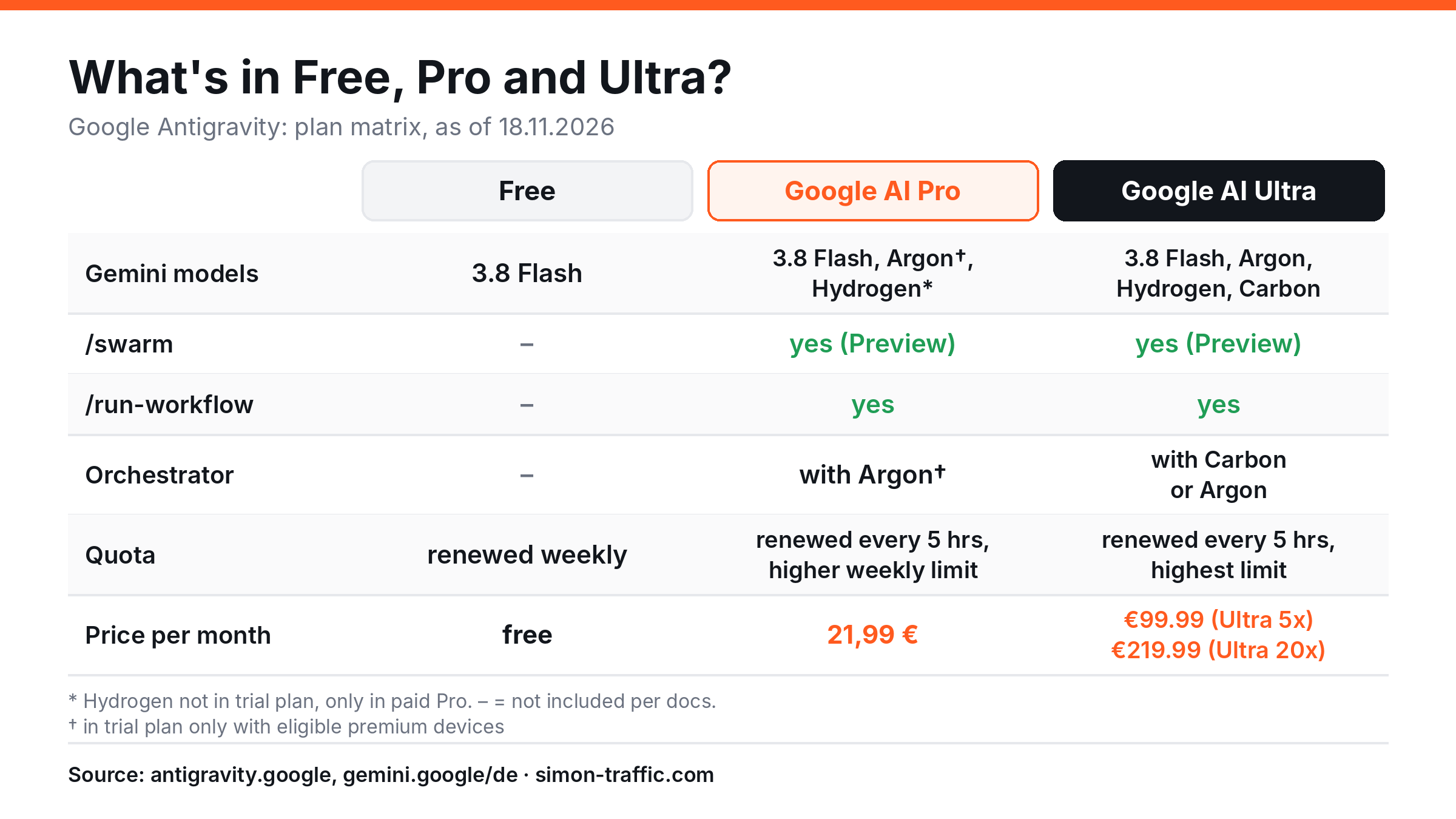
For /swarm and /run-workflow, Google AI Pro at €21.99 a month is enough; you only need Ultra for Gemini 4 Carbon and the Orchestrator (Carbon).3,4,5,7 Ultra comes in two tiers, €99.99 and €219.99. The table shows what is possible in which plan. The prices apply to Germany and are taken from Google's Gemini subscription page of 18 Nov 2026.7
| Free | Google AI Pro | Google AI Ultra | |
|---|---|---|---|
| Price per month | free | €21.99 | €99.99 or €219.99 |
| Quota | Basic, renewed weekly | renewed every 5 hours, higher weekly limit | highest quota, higher (Ultra 5x) or the highest rate limits (Ultra 20x), no factor given on the subscription page |
| Models | Gemini 3.8 Flash (Claude 4.6 and GPT-OSS are dropped on 18 Nov 2026)5 | Gemini 3.8 Flash, Argon, Hydrogen, Claude Sonnet and Opus 5.5 (Hydrogen and Claude 5.5 only in paid Pro, not in the trial subscription; Argon in the trial subscription only on premium devices)5 | additionally Gemini 4 Carbon |
| Subagents, parallel background agents | yes | yes | yes |
| /swarm (preview) | no | yes | yes |
| /run-workflow | no | yes | yes |
| Orchestrator | no | Orchestrator (Argon) | Orchestrator (Carbon) and Orchestrator (Argon) |
Sources: Google Antigravity, prices, plans and models, Gemini subscriptions Germany, as of 18 Nov 2026.3,4,5,6,7
Use the graphic on your site
You may use the graphic freely with attribution. To do so, copy this code:
<a href="https://simon-traffic.com/en/blog/ai-automation/google-antigravity-update-swarm-orchestrator-run/"><img src="https://simon-traffic.com/assets/blog/google-antigravity-update/google-antigravity-update-plaene.en.png" alt="What is possible in Free, Pro and Ultra with Google Antigravity? Plan matrix: Free at no cost, Pro 21.99 euros, Ultra 99.99 euros (Ultra 5x) or 219.99 euros (Ultra 20x), with models, /swarm, /run-workflow and Orchestrator" width="1200" height="675"></a>
<p>Source: <a href="https://simon-traffic.com/en/blog/ai-automation/google-antigravity-update-swarm-orchestrator-run/">Simon Traffic, Google Antigravity Update: plans and features</a></p>
Here are three points on which the question of plans is decided in practice:
- Carbon starts at €99.99. If you want to run a swarm with Gemini 4 Carbon, you need Ultra at the very least.5,7 According to Google, Argon remains an ideal choice for most demanding engineering and knowledge tasks.1
- A company address is a stumbling block. With an address on your own domain (for example
you@yourcompany.com), you currently get no Antigravity plans via Google Workspace, not even as a one-person company. By default you only get a limited starter quota. For more, you need a personal Google account with Pro or Ultra, your own Google Cloud project with pay-as-you-go billing, or Gemini Enterprise.6,9 - Teams and pay-as-you-go billing. For teams there are the Gemini Enterprise plans (Standard and Plus) from US$30 per seat per month (about €27.35, ECB rate of 18 Nov 2026: €1 = US$1.0968) and the Gemini Enterprise Edition Pay-as-you-go with no seat fee.6 This is to be distinguished from pay-as-you-go via your own Google Cloud project, which the docs explicitly describe as something different from this edition. There you pay API prices per request and have no included quota.18 In the standard tier, the Gemini API price list gives for Carbon until 30 Nov 2026 US$2.00 input and US$10.00 output per million tokens (about €1.82 and €9.12), from 1 Dec 2026 US$4.00 and US$20.00 (about €3.65 and €18.23), and for Hydrogen in the paid standard tier US$1.50 and US$7.50 (about €1.37 and €6.84); in the free tier Hydrogen is free. Batch, Flex and Priority have their own rates.17 Those are the Gemini API rates. Which of them Antigravity charges per model in pay-as-you-go mode is not stated on the pages checked. In the paid standard tier of the Gemini API, the price list shows “No” in the field “Used to improve our products”; that concerns the API and says nothing about Antigravity itself.17
Google doesn't say how many tasks fit into which plan, and according to Google the usage limits can change.6,7
In parallel or one after another? The traffic light for your tasks
Only let agents work in parallel when the parts don't need each other and don't change the same files. In my judgement, a simple traffic light helps here. It is my rule of thumb, derived from the hints in Google's documentation, not a Google guideline.
| Traffic light | Situation | Example from a business | Recommendation |
|---|---|---|---|
| Green: in parallel | Parts are independent and touch different files | Drafting three offer pages for three target groups, checking each product description individually, writing texts for several channels | /run-workflow with parallel(), subagents or /swarm, starting with 2 agents |
| Amber: in parallel with caution | Parts are independent but need a lot of quota or the browser | Testing many pages individually in the browser, processing large amounts of text | Start small, use a verifier with /swarm, check the result and quota after every run4,13 |
| Red: one after another | Step B needs the result of step A, several parts would change the same files, or the action can't be undone | First the concept, then the implementation; several changes to the same website; sending emails, publishing, deleting, paying | pipeline() or a single agent, approval always from you3 |
| Red: never unattended | Customer data, access credentials, anything with an external effect | Customer lists, passwords, invoices, dispatch | Don't give it to agents, or only with test data |
To get started, that means: pick a task from the green row where you can easily check the result, and begin with two agents. You can assess how ready your business is for agents overall in my article on AI maturity.
The task template: how to describe a job for an agent team
Agents in a swarm start with an empty context and a written job.4 With /run-workflow, the agents see neither the script nor each other, so every job has to contain everything needed.3 That is why, in my judgement, the quality of the job matters more for the result than the number of agents. The template below answers four questions: who is the company? Who is the result for? What exactly should be delivered? How do you recognise a good result? On top of that come limits and hand-over, which matter especially with teams.
Company: [Name, industry, location, what you offer, in two sentences]
For whom: [Target group, their problem, what they already know]
Task: [What exactly is to be produced? Format, length, language, tone]
Good result: [Three points you can check in one minute after the run]
Limits: [What the agent must not change or touch, which folders are off limits]
Hand-over: [Folder and file name, plus three sentences: what was done, what is open, what is uncertain]
A completed example with an invented business:
Company: Gartenbau Müller, landscape gardening firm in Cottbus, 8 employees,
garden maintenance and patio building for private customers.
For whom: Homeowners aged 40 and over with a garden, who are looking for a fixed
maintenance appointment and want to see prices in advance.
Task: An offer page "Garden care subscription" in plain German, 400 words at most,
with three packages and a price table. Friendly tone, formal address (Sie).
Good result: 1) Each package has a service and a price. 2) No statement that is not
in the documents in the "sources" folder. 3) A clear appointment button at the end.
Limits: Only write to the "draft" folder, only read "sources", delete nothing, do not invent prices.
Hand-over: draft/garden-care-subscription.md and a three-sentence summary with open questions.
The comparison shows how a weak job differs from a usable one:
| Weak job | Better job |
|---|---|
| “Make me a page for my offer.” | A page with target group, length, tone and packages, as in the example above |
| “Check everything.” | “Check each product description individually for spelling and missing dimensions, and return a list per file.” |
| No limits | “Only write to the draft folder, delete nothing, don't invent figures.” |
| No yardstick | “It is good if every statement can be found in the sources in the folder.” |
| One agent for everything | Subtasks that can be checked independently |
Data protection for small businesses: what the terms of service say
Don't enter confidential customer data into Antigravity with a personal account, because according to the terms of service, Google employees and contractors may view and use the collected usage data (the “Interactions”).8 This is not legal advice but a summary of what was on Google's pages on 18 Nov 2026. For binding statements, ask your data protection officer or a legal adviser.
| Question | What the sources say | Status |
|---|---|---|
| Who can see usage data? | Google employees and contractors may “access, view, review and use” Interactions; Google asks you not to enter confidential information8 | documented |
| What does Google use the data for? | For improving products and machine learning, which you can change in the settings; even with telemetry switched off, Google uses data for operating the service and for security8 | documented |
| Deletion? | On request by email to antigravity-support@google.com, for remote agents also in the settings8 | documented |
| Who is responsible for the agent? | You alone, for the agent's actions, the approval of access and supervision in production use8 | documented |
| Does it apply in Germany? | Germany, Austria and Switzerland appear in the FAQ's country list, use from age 189 | documented |
| Company accounts? | Business accounts run under the Google Cloud terms (Gemini Enterprise)6,8 | documented |
| Pay-as-you-go in your own cloud project? | The Google Cloud terms apply; according to the docs, Antigravity collects no telemetry in this case, meaning no automatically transmitted usage data18 | documented |
| Processing location for Free, Pro and Ultra? | Not stated on the pages checked | not documented |
| Processing location for pay-as-you-go in your own cloud project? | You choose Global, US or Europe when signing in18 | documented |
| Processing location for Gemini Enterprise? | Regional data residency requirements apply to Google's own Gemini models (regions global, us, eu); third-party models run in global, us and eu, not in individual countries21 | documented |
| Data processing agreement (DPA, in German “Auftragsverarbeitungsvertrag”, AVV)? | Not stated on the pages checked | not documented |
| EU AI Act? | No reference on the pages checked | not documented |
My practical conclusion: I would try Antigravity with test data and your own documents, but I wouldn't put customer lists, contracts or access credentials into the project folder. You should choose the data-use setting deliberately before you enter anything for the first time. As long as the processing location and the data processing agreement remain open for Free, Pro and Ultra, customers' personal data is off limits there for me. If you want to choose an EU region, you'll find a region choice with pay-as-you-go and Gemini Enterprise. The pages checked don't mention a data processing agreement there either. If you still want to automate such tasks, read my article on Google Antigravity with local models. There, the agent runs on your own computer.
How to get started: step by step
A safe start is a small test with two agents and data that isn't confidential. Here's how to go about it:
- Check your account. Sign in with a personal Google account, not with your company address, because Workspace accounts on your own domain currently get no Antigravity plans.6,9 For /swarm and /run-workflow you need at least Google AI Pro at €21.99 a month.3,4,7
- Set the data protection setting. Open the settings and decide whether Google may use your Interactions for improvement.8
- Create a test folder. Copy in only material that isn't confidential, for example texts from your own website or product lists with no customer reference.
- Choose a model. With Pro you can use Argon, Hydrogen (only in paid Pro) and the Orchestrator (Argon).5
- Write the job. Fill in the template from above, with limits and hand-over.
- Start small. Give two independent jobs. In the app, type
/swarm, press Tab and describe the project. You can follow the progress in the app in the side panel. In the command line, you open the board with/swarm board.4 - Don't loosen permissions. Leave the default approvals on and only enable profiles such as Turbo once you understand what happens.3
- Read the result yourself. A verifier agent doesn't replace your own check. Read what comes back before you use anything.4
- Watch the quota. After the first run, look at how much of the quota is gone, and only then increase the number of agents.1
- Save recurring tasks as a workflow. If the same check comes up regularly, have a script written with /run-workflow, read it before starting and save it.3
Limits and open questions
The information in this article comes from Google's announcements and documentation, not from a long-term test of /swarm of my own. The following points are therefore open or depend on Google:
- /swarm is a preview. Features and limits may change.1,6
- Quota unclear. Google gives no figures for how many agents or jobs fit into a plan, only that teams use it up faster.1,4,6
- Vendor measurements. The Orchestrator values (24% less quota, 19% faster) come from Google's own test.2
- Plan details. The docs list /run-workflow only for Pro and Ultra. The command line changelog (v1.5.9, 14 Nov), on the other hand, says the tool was added “for everyone”. I follow the docs. Check in your account what you see.3,11
- Data protection. The processing location for Free, Pro and Ultra, the data processing agreement and any EU AI Act reference are not documented on the pages checked. With pay-as-you-go and Gemini Enterprise there is a choice of region.8,18,21
Conclusion
The Google Antigravity update is worth it for small businesses and agencies if you have a job that can be split into independent parts and you're prepared to check the result yourself. In my judgement, Google AI Pro at €21.99 a month is enough to get started with /swarm, /run-workflow and the Orchestrator (Argon), and Ultra only pays off when you specifically need Gemini 4 Carbon. I would start with two agents and a clearly described green task, choose the data protection setting deliberately and keep customer data out. And if you notice that your business has more tasks that a team of AI agents could take over, let's have a quick chat about which one is worth doing first.
Frequently asked questions about Google Antigravity
What is new in the Google Antigravity update?
In November 2026, Google added three features: /swarm as a preview since 10 Nov (in the app, according to the changelog, since 9 Nov), the Orchestrator with Gemini 4 Hydrogen since 12 Nov, and the Dynamic Workflows with /run-workflow since 13 Nov (in the command line since 14 Nov). /swarm and /run-workflow start several agents; the Orchestrator is a single agent with two models. The standalone app without a development environment has existed since Antigravity 2.0 of 19 May 2026.1,2,3,5,10,11
What is /swarm in Google Antigravity?
/swarm starts a team of agents with a coordinator, several workers and verifiers who coordinate via a shared board. It is a preview and, according to Google, uses up quota much faster than a normal chat.1,4
How much does Google Antigravity cost in euros?
The basic plan is free, Google AI Pro costs €21.99 a month, and Google AI Ultra €99.99 or €219.99 a month (as of 18 Nov 2026, Germany).6,7
Do I need Ultra for /swarm?
No, according to the docs /swarm is also available with Google AI Pro, and since 17 Nov in the app for Business and Enterprise accounts as well. The workers run on your conversation's model, so with Pro (my inference) on the models of your plan. You need Ultra for Gemini 4 Carbon and the Orchestrator (Carbon).4,5,7,11
What is the difference between /swarm and /run-workflow?
With /run-workflow, a readable script controls the agents in a fixed sequence; they return structured results to the script and don't talk to each other. With /swarm, the agents coordinate with each other via a shared board.3,4
What does the Orchestrator do in Antigravity?
In a single agent, the Orchestrator pairs a planner model (Carbon or Argon) with Gemini 4 Hydrogen. The planner plans and checks, Hydrogen executes, and when there are problems Hydrogen hands back to the planner.2,5
Can I use Antigravity with my company email address?
You can sign in, but with a Workspace address on your domain you only get a limited starter quota by default and no Pro or Ultra plans. For more usage you need a personal Google account, your own Google Cloud project with pay-as-you-go billing, or Gemini Enterprise.6,9
Does Google see my data in Antigravity?
According to the terms of service, Google employees and contractors can view and use the collected usage data (Interactions); you can change the use for product improvement in the settings. On the processing location for Free, Pro and Ultra and on the data processing agreement, the pages checked say nothing. With pay-as-you-go you choose Global, US or Europe; with Gemini Enterprise there is regional data residency. This article is not legal advice.8,18,21
Does Google Antigravity also run locally?
Via the SDK (Google's toolkit for your own agents), yes: according to the docs, agents then run on your computer with local models, without an API key and without an internet connection.22 How that works is explained in my article on Google Antigravity with Ollama. Whether /swarm and /run-workflow run with local models is not stated on the pages checked. Both are available in the app and in the command line.3,4
Do I need programming skills for /run-workflow?
You don't have to write the Python script yourself. The agent does that. But you should read it before it starts, and you can reject it with “No” and a change request.3 For work without code, since 9 November the app has a “Knowledge Work” layout that hides the Git branch selector and the display of code changes. You switch it under Settings, General, Interface Layout, except on Business and Enterprise accounts.11,19
How quickly is the quota used up with several agents?
Google gives no figures for this. The docs only say that a swarm uses up quota much faster than a single conversation. So start with two agents and watch the usage.1,4
Suggested citation
Gütter, Simon (2026): Google Antigravity Update: /swarm, Orchestrator, /run-workflow and Euro Prices. Simon Traffic, 18 November 2026. https://simon-traffic.com/blog/ki-automatisierung/google-antigravity-update/
Sources
- Google Antigravity Team: Gemini 4 Carbon and /swarm, blog, 10/11/2026, retrieved on 18/11/2026. https://antigravity.google/blog/gemini-4-carbon-in-google-antigravity
- Google Antigravity Team: Gemini 4 Hydrogen and Orchestrator, blog, 12/11/2026, retrieved on 18/11/2026. https://antigravity.google/blog/gemini-4-hydrogen-in-google-antigravity
- Google Antigravity: Dynamic Workflows (/run-workflow), documentation, retrieved on 18/11/2026. https://antigravity.google/docs/dynamic-workflows
- Google Antigravity: Agent swarms (/swarm), documentation, retrieved on 18/11/2026. https://antigravity.google/docs/swarm/
- Google Antigravity: Models and Orchestrator, documentation, retrieved on 18/11/2026. https://antigravity.google/docs/models/
- Google Antigravity: Pricing and Plans, retrieved on 18/11/2026. https://antigravity.google/pricing and https://antigravity.google/docs/plans/
- Google: Gemini subscriptions Germany (Google AI Plus, Pro, Ultra), retrieved on 18/11/2026. https://gemini.google/de/subscriptions/
- Google Antigravity: Terms of Service, retrieved on 18/11/2026. https://antigravity.google/terms
- Google Antigravity: FAQ, including Google Workspace accounts and country list, retrieved on 18/11/2026. https://antigravity.google/docs/faq/
- Google Antigravity Team: Introducing Google Antigravity 2.0, blog, 19/05/2026, retrieved on 18/11/2026. https://antigravity.google/blog/introducing-google-antigravity-2
- Google Antigravity: Changelog (app v2.29.0 to v2.33.0, CLI v1.5.5 to v1.5.9), retrieved on 18/11/2026. https://antigravity.google/docs/changelog
- Google Antigravity (X): post of 17/11/2026 on the newly built interface, retrieved on 18/11/2026. https://x.com/antigravity/status/2122514607726043205
- Google Antigravity: Browser, documentation, retrieved on 18/11/2026. https://antigravity.google/docs/browser/
- Google Antigravity Team: Antigravity voice mode, blog, 06/11/2026, and documentation Voice mode, retrieved on 18/11/2026. https://antigravity.google/blog/antigravity-voice-mode and https://antigravity.google/docs/voice-mode/
- Google Antigravity: Side questions (/btw), documentation, retrieved on 18/11/2026. https://antigravity.google/docs/commands/btw/
- Google Antigravity: Automations and /schedule, documentation, retrieved on 18/11/2026. https://antigravity.google/docs/commands/automation/ and https://antigravity.google/docs/commands/schedule/
- Google AI Studio: Gemini API Pricing (redirect from ai.google.dev/gemini-api/docs/pricing), retrieved on 18/11/2026. https://aistudio.google.com/docs/pricing
- Google Antigravity: Pay As You Go, documentation, retrieved on 18/11/2026. https://antigravity.google/docs/pay-as-you-go/
- Google Antigravity Team: Google Antigravity for Knowledge Work, blog, 09/11/2026, retrieved on 18/11/2026. https://antigravity.google/blog/antigravity-for-knowledge-work
- Google Antigravity: Permissions, permission profiles, documentation, retrieved on 18/11/2026. https://antigravity.google/docs/permissions/
- Google Antigravity: Gemini Enterprise, documentation including regions and data residency, retrieved on 18/11/2026. https://antigravity.google/docs/enterprise/
- Google Antigravity: Antigravity SDK, Local models, documentation, retrieved on 18/11/2026. https://antigravity.google/docs/sdk/local-models/
- Google Antigravity Team: Changes to Antigravity plans, blog, 19/05/2026, retrieved on 18/11/2026. https://antigravity.google/blog/changes-to-antigravity-plans
As of: 18 November 2026. Prices, plans, quotas and features of Google Antigravity may change, and /swarm is a preview. Euro values of the US dollar prices are converted using the ECB reference rate of 18 Nov 2026 (€1 = US$1.0968); the euro prices of the Google subscriptions come directly from Google's German page.